<- Back
2022 – 2025
Improving Internal Panel for housinganywhere
Research
Product strategy
Interface design
housinganywhere.com
A global rental platform that connects tenants with landlords for mid- to long-term stays.
Behind the scenes, Customer Support, Finance, Trust & Safety, Sales, and Marketing all use an Internal Panel to manage bookings, users, and payments. But it had grown into a mess. Teams were switching between tools and doing things manually that should have been automated.
My role
- 0→1 Redesign / Product Strategy
- User Research & Workflow Analysis
- Interface Design / Interaction Design
- Design System & UI Patterns
- Translate Internal pain points into features for the main product
Improvements
- 41% operational efficiency gain
- 75% reduction in manual work
- 30+ hours saved per week across teams
Problems
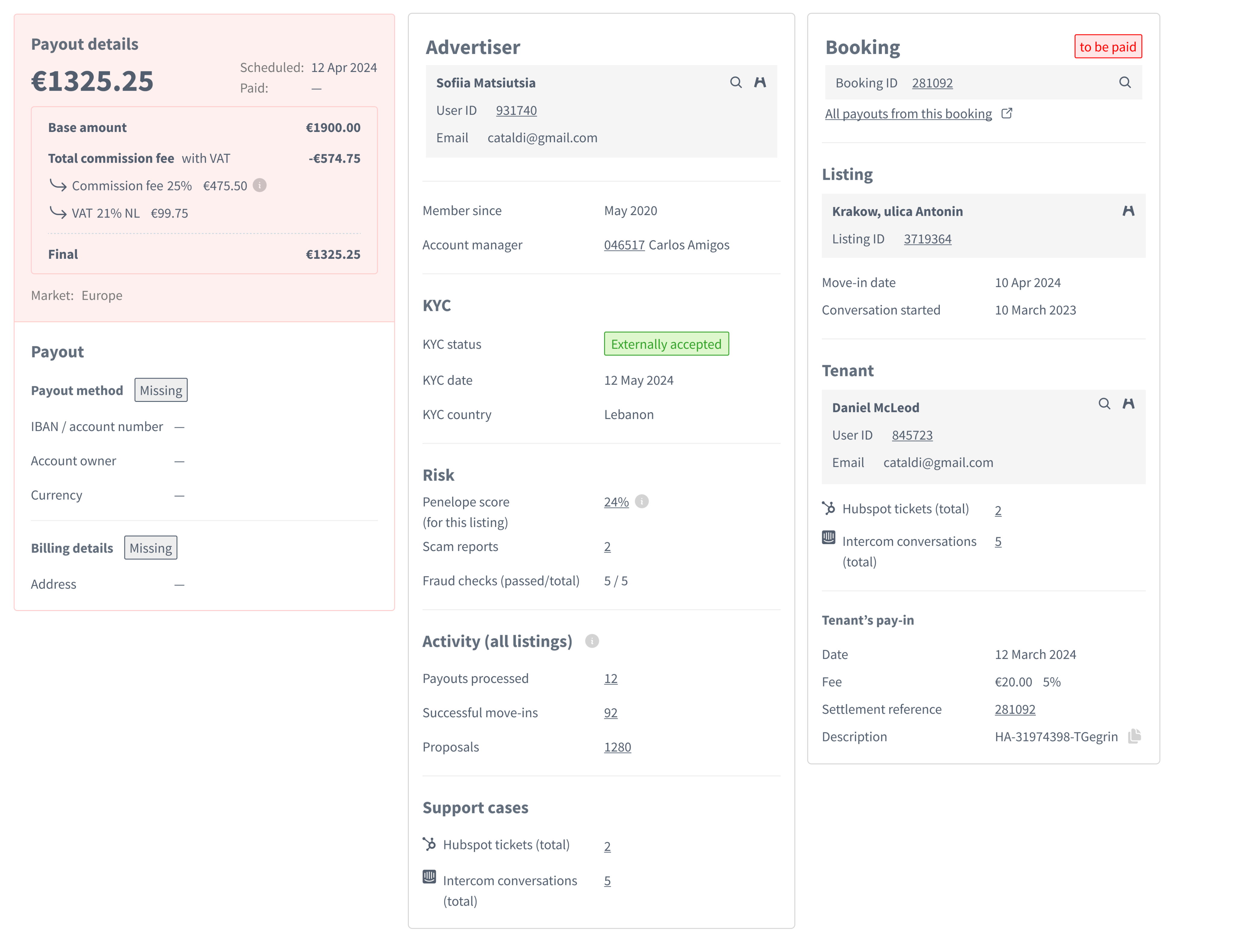
Teams were manually handling everything
Refunds. Booking changes. Payouts. They'd copy-paste sensitive data between systems, coordinate manually, hope nothing broke. Error-prone. Time-consuming.
Teams were manually handling everything
Refunds. Booking changes. Payouts. They'd copy-paste sensitive data between systems, coordinate manually, hope nothing broke. Error-prone. Time-consuming.
Navigation made no sense
The Admin Panel had grown organically for years. No consistent design. Filters were hard to use. Pagination was broken in some places. No patterns for building new features.
Solution examples
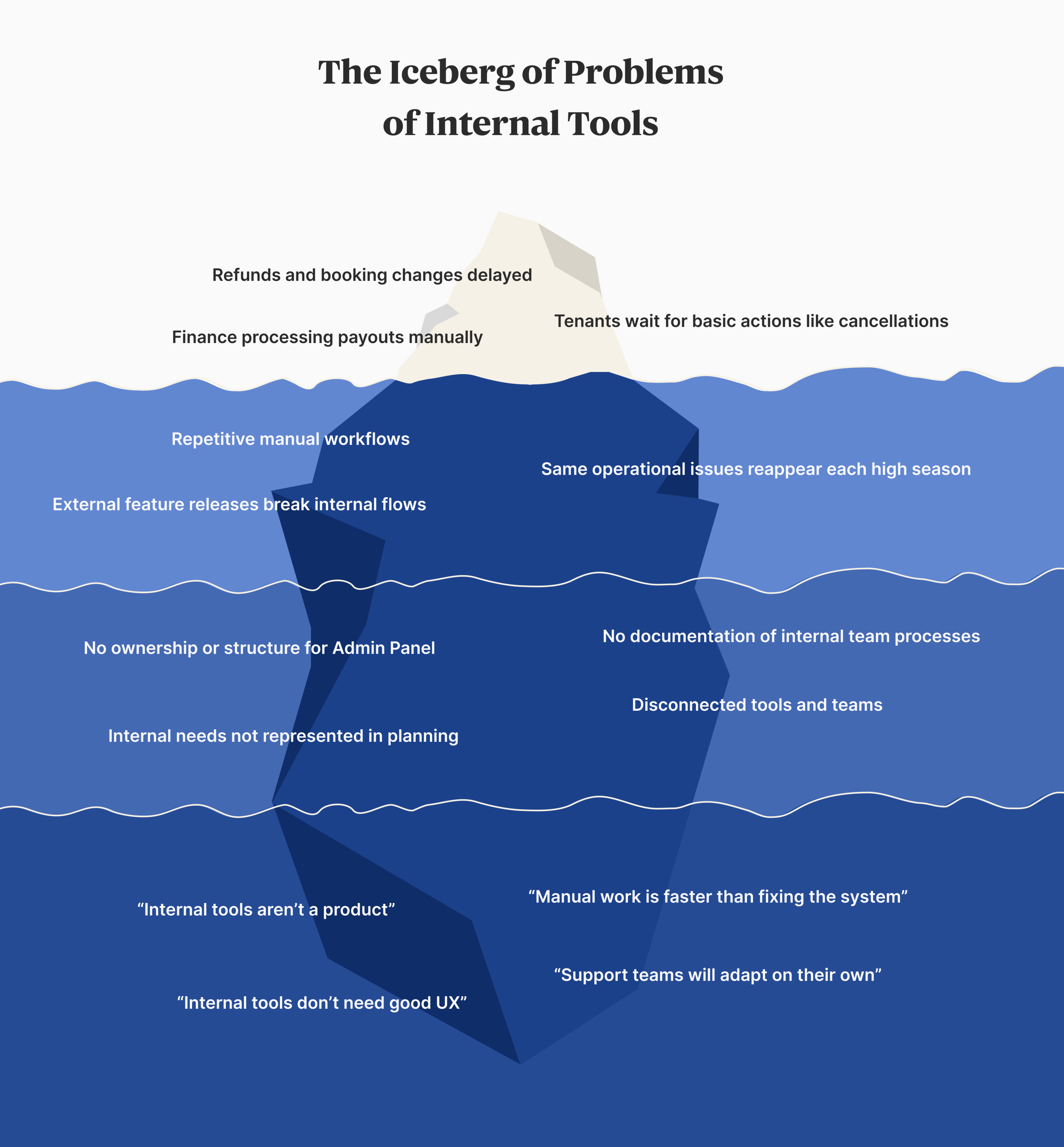
- Reorganized user page
Previously, the page was an unstructured mess. Data was hard to find or missing.
We ran a moderated card sorting exercise with internal teams. This helped us understand priorities from the perspective of Sales, Support, Finance, Customer Support, etc.
The new layout introduces role-based tabs and clear UI patterns (tables, metrics, cards...). It lets Product Owner and Developers add new data without Designer’s intervention.
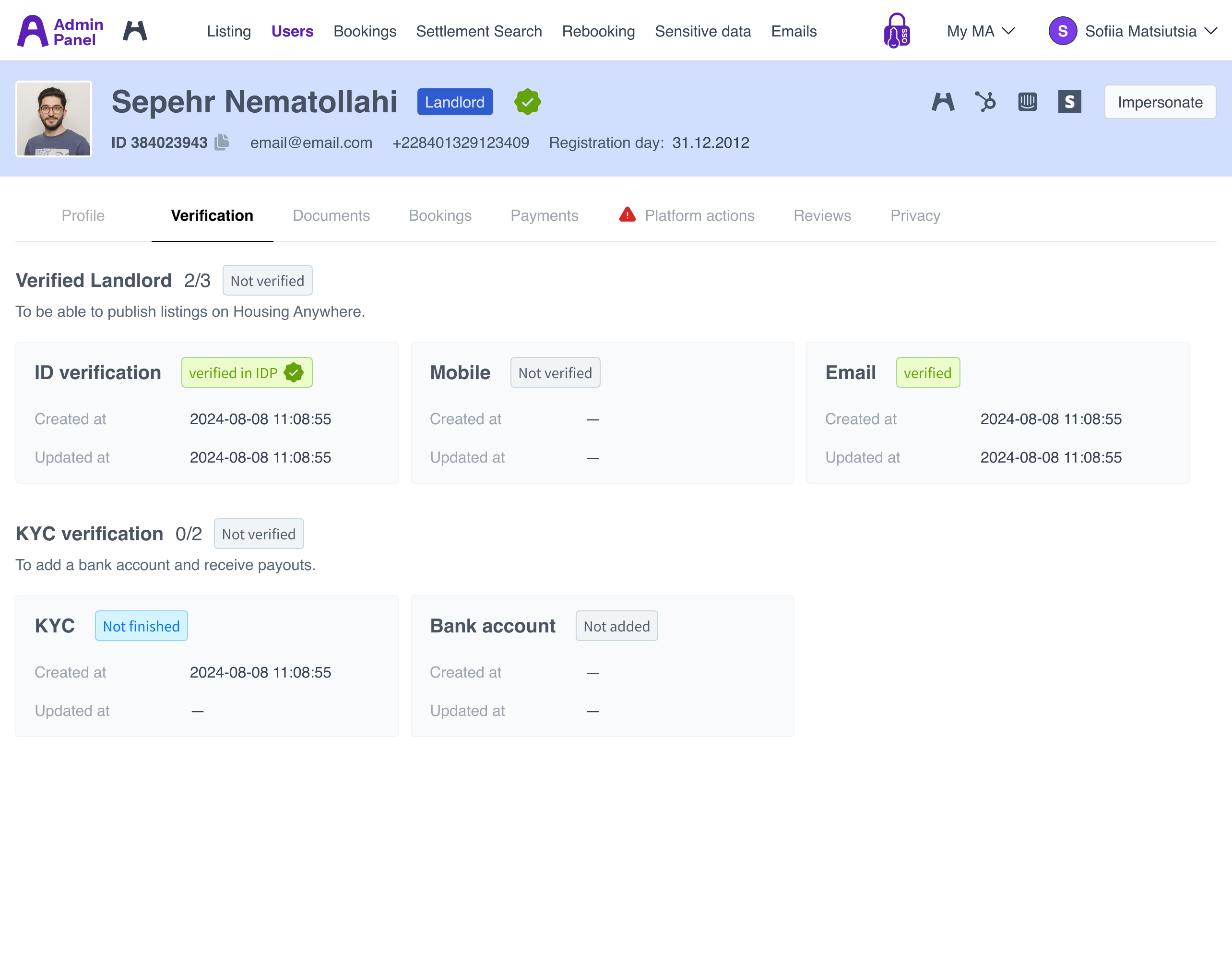
- Automated cancellations and refunds processes
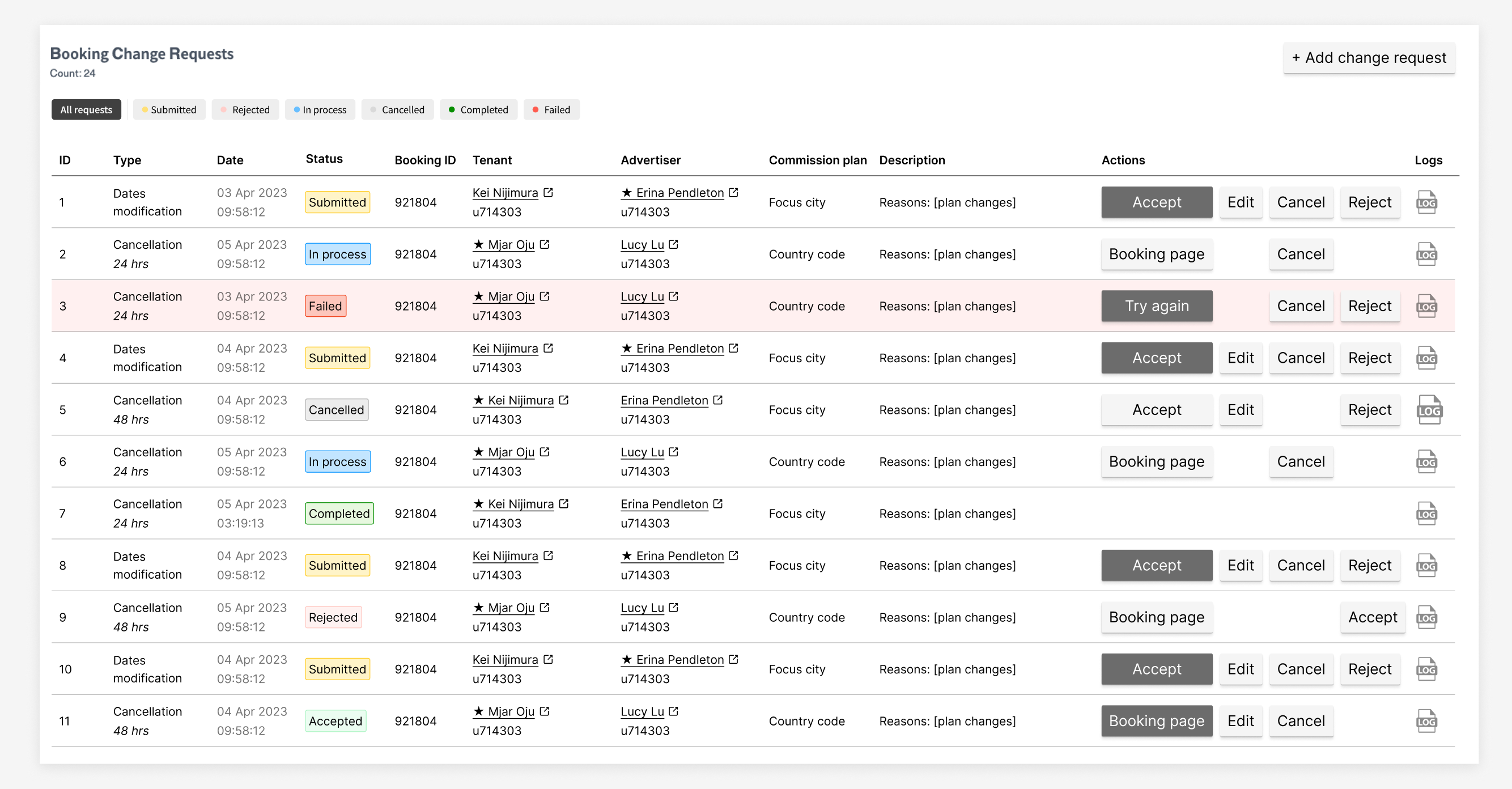
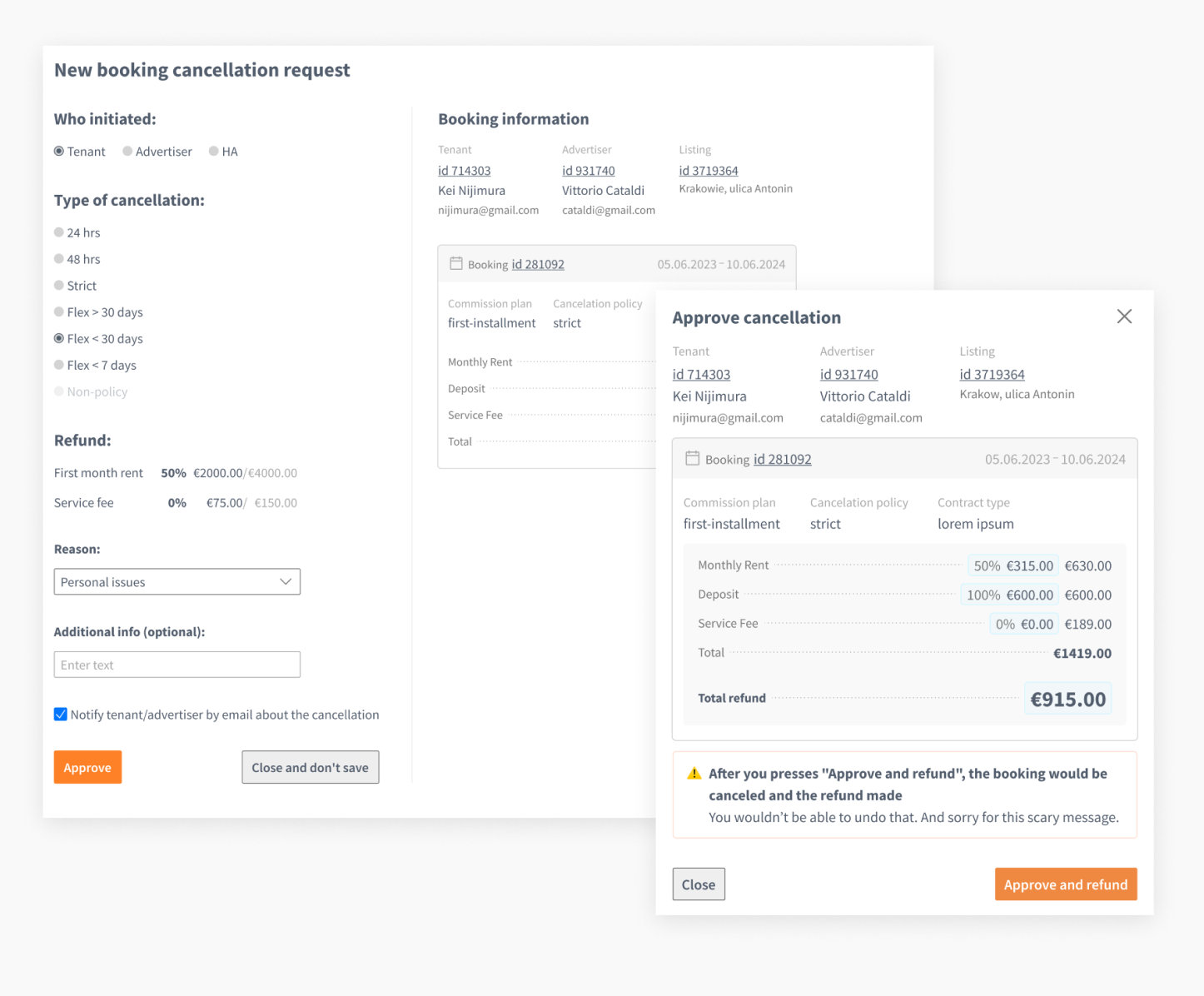
Before the BCR Tool was introduced, fully manual process of canceling or modifying a booking was prone to human error, scattered across 5 tools (Front Office application, HubSpot, Intercom, Moneta, Google Sheets), difficult to track, and not scalable.
We turned complex workflows into one tool to track, view, and edit booking change or cancellation requests.
The process
- Shadowed teams doing the work
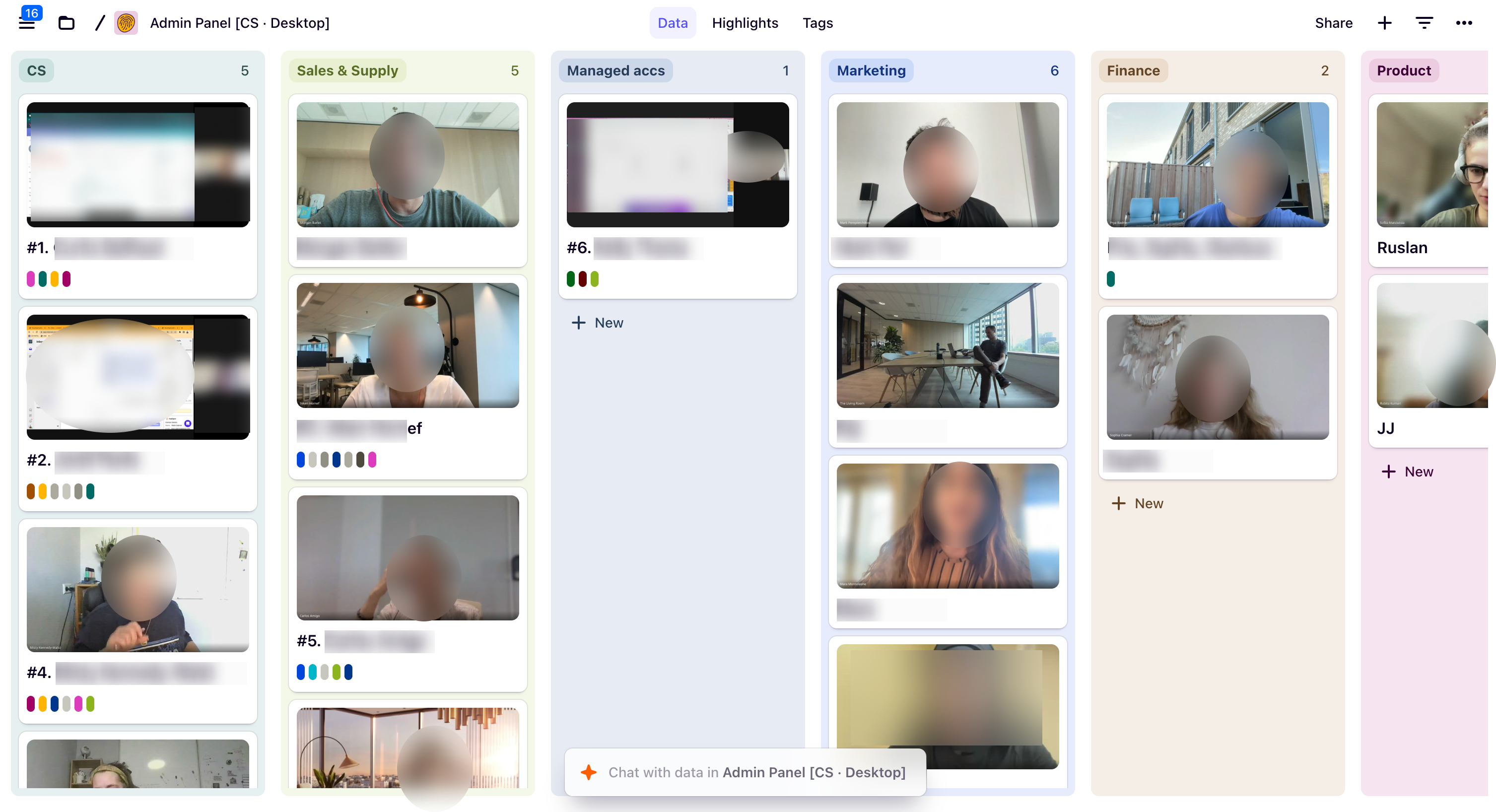
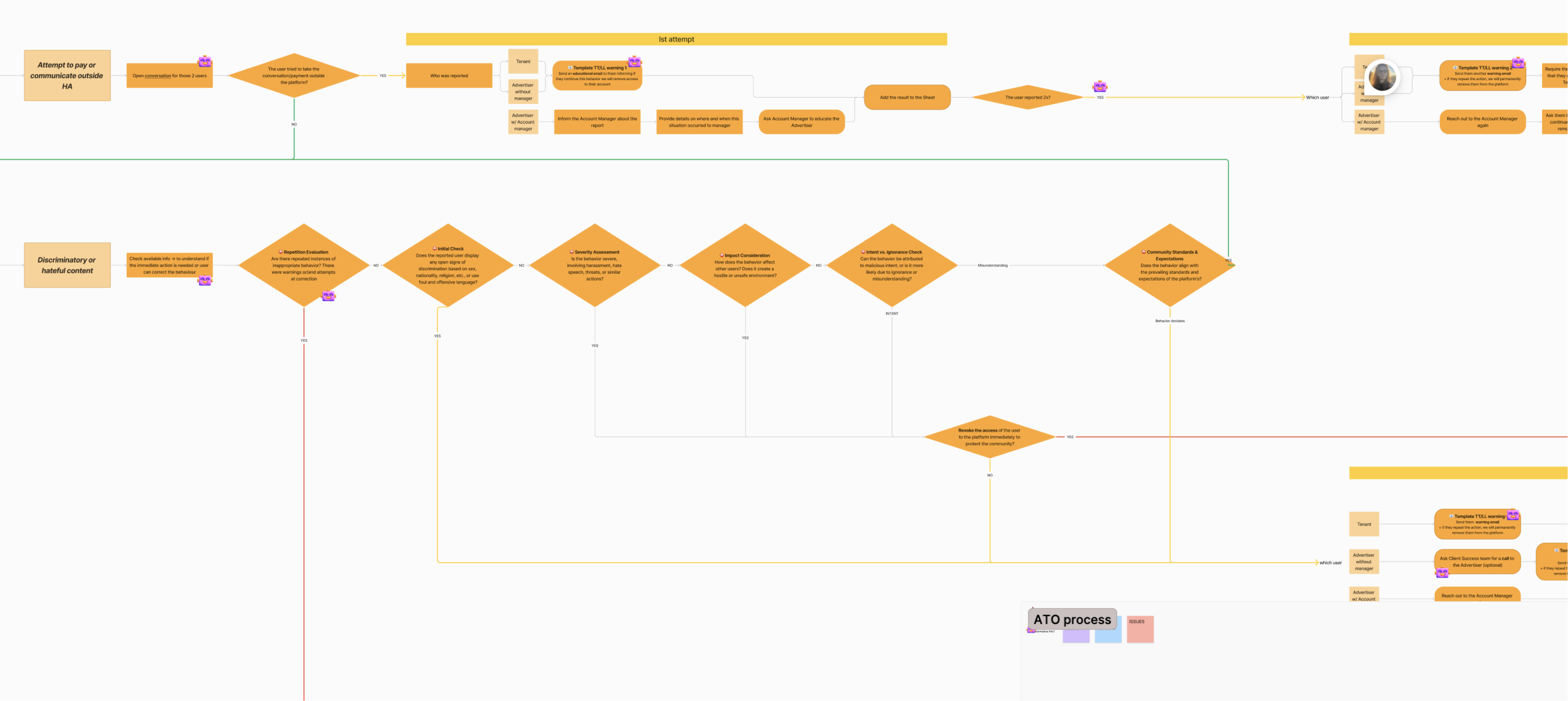
I spent time with Finance, Customer Support, Sales, Marketing watching them handle refunds, booking changes, payouts. Saw where they got stuck, and what made them slower.
- Centralized data views
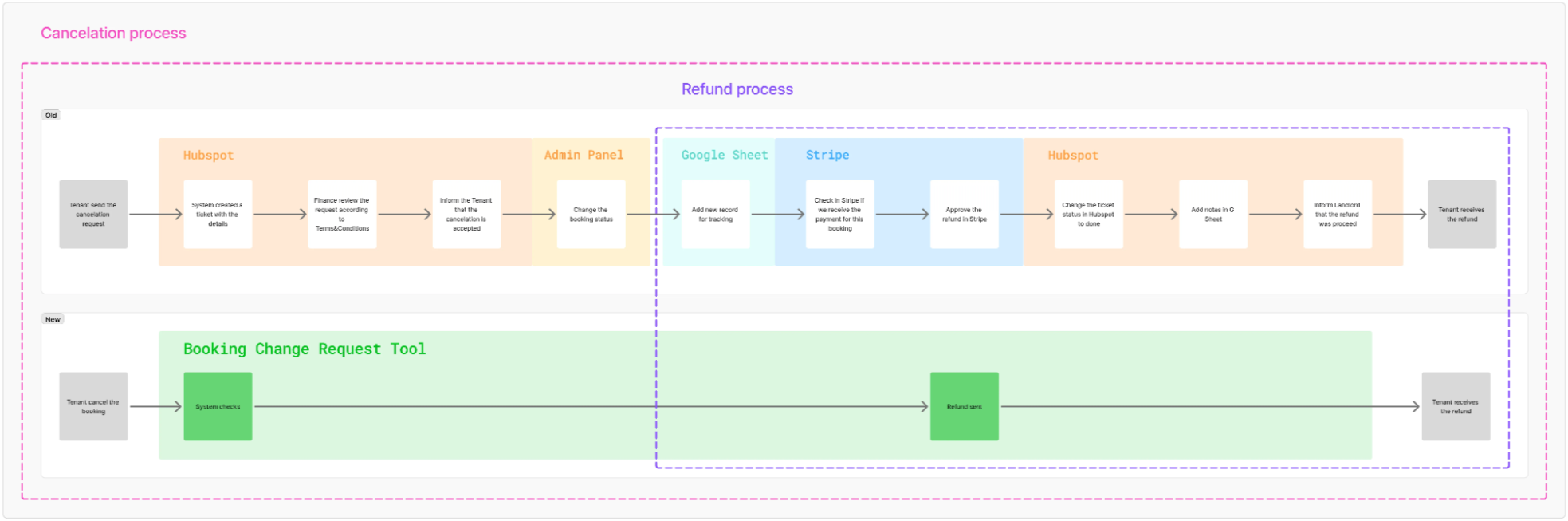
Instead of jumping between 6 tools, I brought relevant data into the Admin Panel. For example, User profiles now show everything in one place: tenant details, landlord info, payment history, actions, next steps.
- Designed new flows
Refunds used to be manual and risky. I designed the tools like Booking Change Request, that automates decisions based on booking data.
- Built consistency
Created a UI foundation based on Tailwind with reusable patterns. Updated page layouts. Fixed filtering, sorting, pagination. Documented everything so teams could ship new features without starting from scratch.
<- Back
2022 – 2025
Improving Internal Panel for housinganywhere
Research
Product strategy
Interface design
housinganywhere.com
A global rental platform that connects tenants with landlords for mid- to long-term stays.
Behind the scenes, Customer Support, Finance, Trust & Safety, Sales, and Marketing all use an Internal Panel to manage bookings, users, and payments. But it had grown into a mess. Teams were switching between tools and doing things manually that should have been automated.
My role
- 0→1 Redesign / Product Strategy
- User Research & Workflow Analysis
- Interface Design / Interaction Design
- Design System & UI Patterns
- Translate Internal pain points into features for the main product
Improvements
- 41% operational efficiency gain
- 75% reduction in manual work
- 30+ hours saved per week across teams
Problems
Teams were manually handling everything
Refunds. Booking changes. Payouts. They'd copy-paste sensitive data between systems, coordinate manually, hope nothing broke. Error-prone. Time-consuming.
Teams were manually handling everything
Refunds. Booking changes. Payouts. They'd copy-paste sensitive data between systems, coordinate manually, hope nothing broke. Error-prone. Time-consuming.
Navigation made no sense
The Admin Panel had grown organically for years. No consistent design. Filters were hard to use. Pagination was broken in some places. No patterns for building new features.
Solution examples
- Reorganized user page
Previously, the page was an unstructured mess. Data was hard to find or missing.
We ran a moderated card sorting exercise with internal teams. This helped us understand priorities from the perspective of Sales, Support, Finance, Customer Support, etc.
The new layout introduces role-based tabs and clear UI patterns (tables, metrics, cards...). It lets Product Owner and Developers add new data without Designer’s intervention.
- Automated cancellations and refunds processes
Before the BCR Tool was introduced, fully manual process of canceling or modifying a booking was prone to human error, scattered across 5 tools (Front Office application, HubSpot, Intercom, Moneta, Google Sheets), difficult to track, and not scalable.
We turned complex workflows into one tool to track, view, and edit booking change or cancellation requests.
The process
- Shadowed teams doing the work
I spent time with Finance, Customer Support, Sales, Marketing watching them handle refunds, booking changes, payouts. Saw where they got stuck, and what made them slower.
- Centralized data views
Instead of jumping between 6 tools, I brought relevant data into the Admin Panel. For example, User profiles now show everything in one place: tenant details, landlord info, payment history, actions, next steps.
- Designed new flows
Refunds used to be manual and risky. I designed the tools like Booking Change Request, that automates decisions based on booking data.
- Built consistency
Created a UI foundation based on Tailwind with reusable patterns. Updated page layouts. Fixed filtering, sorting, pagination. Documented everything so teams could ship new features without starting from scratch.
<- Back
2022 – 2025
Improving Internal Panel for housinganywhere
Research
Product strategy
Interface design
housinganywhere.com
A global rental platform that connects tenants with landlords for mid- to long-term stays.
Behind the scenes, Customer Support, Finance, Trust & Safety, Sales, and Marketing all use an Internal Panel to manage bookings, users, and payments. But it had grown into a mess. Teams were switching between tools and doing things manually that should have been automated.
My role
- 0→1 Redesign / Product Strategy
- User Research & Workflow Analysis
- Interface Design / Interaction Design
- Design System & UI Patterns
- Translate Internal pain points into features for the main product
Improvements
- 41% operational efficiency gain
- 75% reduction in manual work
- 30+ hours saved per week across teams
Problems
Teams were manually handling everything
Refunds. Booking changes. Payouts. They'd copy-paste sensitive data between systems, coordinate manually, hope nothing broke. Error-prone. Time-consuming.
Teams were manually handling everything
Refunds. Booking changes. Payouts. They'd copy-paste sensitive data between systems, coordinate manually, hope nothing broke. Error-prone. Time-consuming.
Navigation made no sense
The Admin Panel had grown organically for years. No consistent design. Filters were hard to use. Pagination was broken in some places. No patterns for building new features.
Solution examples
- Reorganised user page
Previously, the page was an unstructured mess. Data was hard to find or missing.
We ran a moderated card sorting exercise with internal teams. This helped us understand priorities from the perspective of Sales, Support, Finance, Customer Support, etc.
The new layout introduces role-based tabs and clear UI patterns (tables, metrics, cards...). It lets Product Owner and Developers add new data without Designer’s intervention.
- Automated cancellations and refunds processes
Before the BCR Tool was introduced, fully manual process of canceling or modifying a booking was prone to human error, scattered across 5 tools (Front Office application, HubSpot, Intercom, Moneta, Google Sheets), difficult to track, and not scalable.
We turned complex workflows into one tool to track, view, and edit booking change or cancellation requests.
The process
- Shadowed teams doing the work
I spent time with Finance, Customer Support, Sales, Marketing watching them handle refunds, booking changes, payouts. Saw where they got stuck, and what made them slower.
- Centralized data views
Instead of jumping between 6 tools, I brought relevant data into the Admin Panel. For example, User profiles now show everything in one place: tenant details, landlord info, payment history, actions, next steps.
- Designed new flows
Refunds used to be manual and risky. I designed the tools like Booking Change Request, that automates decisions based on booking data.
- Built consistency
Created a UI foundation based on Tailwind with reusable patterns. Updated page layouts. Fixed filtering, sorting, pagination. Documented everything so teams could ship new features without starting from scratch.